Customizing Default Search Engine in Firefox Desktop
· Updated: May 17, 2026 · Firefox, Browser Customization, Search Engine
Table of contents
Introduction
On Firefox for Android you can pick any default search engine you like, but the desktop version hides that option. It only lets you choose from a preset list such as DuckDuckGo, Google, and Bing. Here’s how to add your own on desktop :)
Modifying Firefox Configuration
These steps change Firefox’s internal configuration settings. It’s not hard, and the steps below walk through each part.
Step 1: Accessing the Configuration Page
- Open Firefox and type
about:configin the address bar. - You’ll see a warning message about the risks of changing advanced settings. Click on the
Accept the Risk and Continuebutton to proceed.

Step 2: Enabling Additional Search Engines
-
In the search bar at the top of the
about:configpage, enterbrowser.urlbar.update2.engineAliasRefresh. -
Locate the preference named
browser.urlbar.update2.engineAliasRefreshand double-click on it to toggle its value fromfalsetotrue.
Step 3: Adding Your Preferred Search Engine
-
Now, head back to the Firefox search settings. You’ll notice a new option:
Add.Click on this option.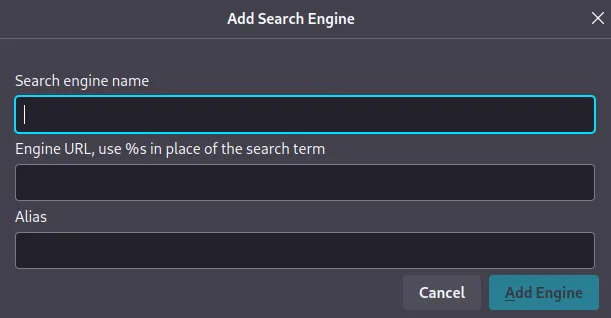
-
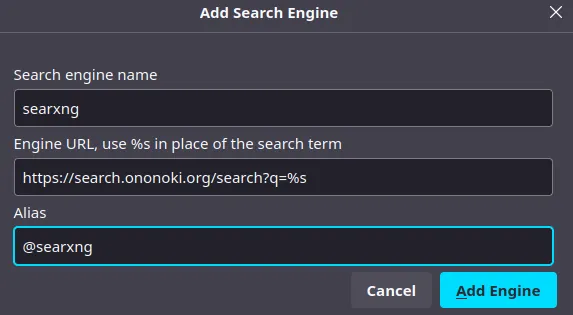
Enter the details of your preferred search engine:
- Search Engine Name: SearXNG
- Engine URL:
https://search.ononoki.org/search?q=%s - Alias: @SearXNG
- Click
Add Engineto save your custom search engine.
Step 4: Set Your Custom Search Engine as Default
-
Return to the search settings and find your newly added search engine in the list.
-
Click on the three-dot menu next to your custom search engine and select
Set as Default.
Conclusion
I recall searching for information on how to customize the default search engine in Firefox desktop, but I struggled to find any useful resources on the topic. While there are methods that involve using extensions, I preferred not to install any additional extension for this purpose.
Eventually, I discovered a solution on Stack Overflow, and I compiled the information provided there, adding images to enhance clarity and make it easier to understand.